
This article explains how to grant a user view and download permissions for all documents in the same group. If you wish to set view permissions for an individual document, see the guide How to edit document viewing rights?
You can grant a user permission to view and download all documents in a specific group within the Documents service in one go. This permission is granted in the user’s settings and does not need to be added to each document individually.
Document viewing permissions can be managed by the company’s Easor App administrator, who has the User Data Management > Edit Permissions option selected.
How to grant a user viewing permissions for all documents in the same group
- Select Settings at the top of the Easor App.
- Select User Management and the user for whom you wish to set viewing permissions.
- Select Easor Service Maintenance.
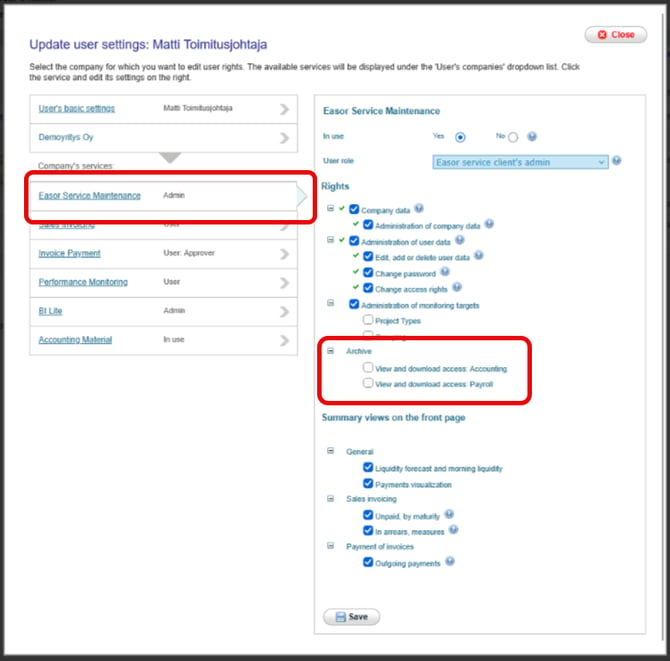
- View and download access: Accounting (formerly Archive Service – Accounting). The user can view and download all documents in the Administration, Accounting, Payments, Sales Invoicing, Organisation and Banking categories.
- View and download access: Payroll (formerly Archive Service – Payroll). The user can download all documents in the Payroll category and can view the sub-categories listed below in the Archive view:
- List of Trade union membership fees
- Average hourly wage calculation
- Monthly summary
- Holiday accrual
- Payslip
- List of payments
- List of salaries
- Working hour reduction
- Employer contributions
- Debt recovery list
- Finally, select Save.
- The user is granted view and download permissions for all documents in the selected category, including retrospectively.
Good to know
- In single-user companies, the View and download rights: Accounting and View and download rights: Payroll settings are automatically selected for the user.
- You can also define document-specific view permissions; any previously defined view permissions for other users will remain unchanged.