
These instructions apply to the new Payments service. How do I know if I’m using the new Payments service?
If your company has several payment accounts, you can choose which account to use for each invoice. If you do not select an account, the invoice will be paid from the default payment account.
Default or a specific account?
The Payment account field has two options, which work differently:
- Default: the invoice is paid from the account that is set as the default payment account on the payment date. If you change the default payment account before the payment date, the invoice will be paid from the new default account. Read more about selecting a default payment account.
- Specific account: the bill will always be paid from the account you select, even if the default payment account changes. Select a specific account from the list even if it is your current default account and you want to ensure that the account does not change before the payment date.
Select the payment account before approval
- Open the purchase invoice from the To be processed tab.
- In the From bank account field, select the account from which the invoice will be paid.
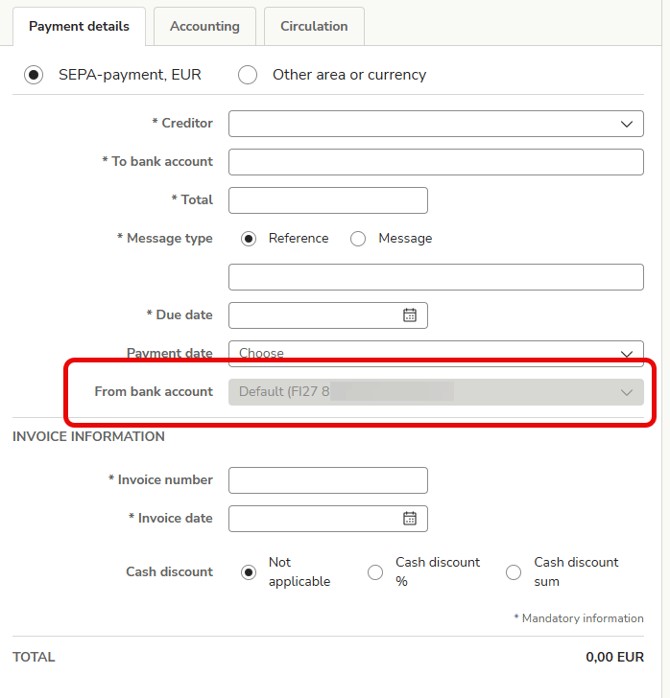
- Approve the invoice. The invoice will move to the Payments tab, and the account you selected will be displayed on the invoice line.
Change the payment account after approval
You can change the payment account for one or more invoices at once while the invoices are on the In payment tab.
-
Go to the Payments tab.
-
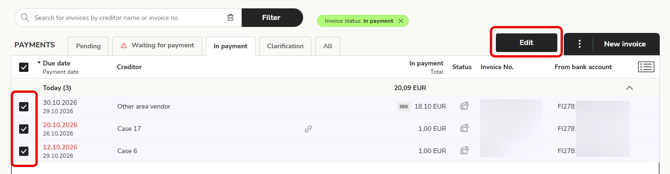
Select the invoices for which you wish to change the payment account and select Edit.
-
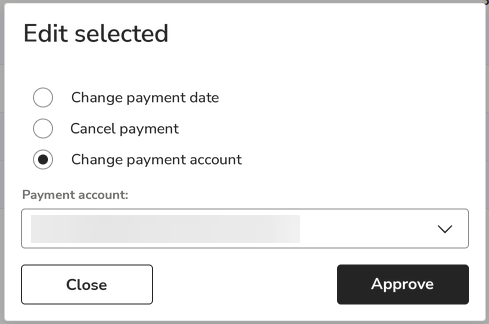
Select Change payment account.
-
Select a new account and select Approve. The account you have selected will appear on the invoice lines.