
Once the invoice is ready, i.e. all invoice lines and other necessary information have been entered, you can send the invoice.
1. Select Send invoice at the top of the invoice view.
2. The button shows the selected delivery method. If you want to change the delivery method, click the arrow on the Send invoice button.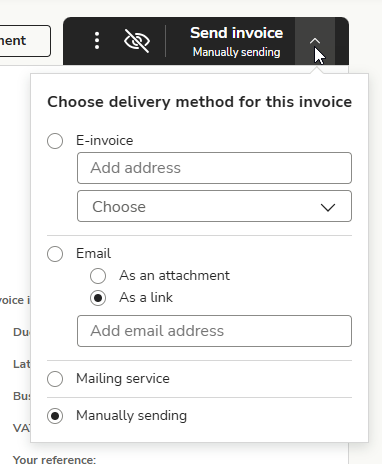
- E-invoice: Enter the e-invoice address and select the intermediary ID. You can search for e-invoice addresses by customer name or business ID in TIEKE's e-invoice address database. E-invoices can be found in the Invoices view in the Scheduled delivery status, and you can edit sales invoices until 8:00 p.m.
- Email: Enter the email address and select whether the invoice will be sent as an attachment or a link. The sender of the message is invoicing@easor.com. Sales invoices sent by email are sent to the customer immediately and move to the Sent status.
- Mailing service: Sales invoices are sent to the customer by letter. Mailing service invoices can be found in the Invoices view in the Scheduled delivery status, and you can edit the sales invoice until 8 p.m.
- Manually sending: The sales invoice is not sent from the system to the customer. Print or download the sales invoice as a PDF file and deliver it to the customer.
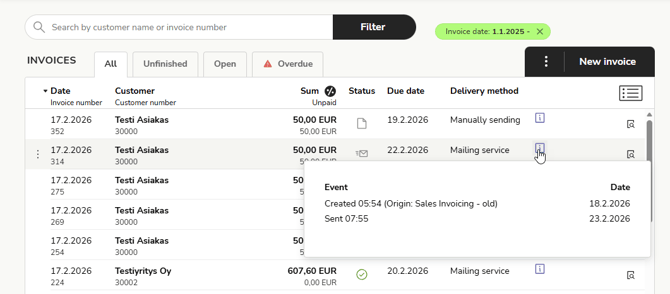
3. You can view the sales invoice delivery and transaction details by clicking the i icon on the invoice row.
4. If you want to leave the sales invoice as a draft, exit the invoice creation mode. You can find the sales invoice draft in the invoice list, and by clicking on the invoice, you can continue editing it.