
In the Sales Invoicing settings, you can, for example, define the payment terms for sales invoices and add your company logo to the sales invoice template.
Please note that you must have sales invoicing admin rights in order to edit the sales invoicing settings.
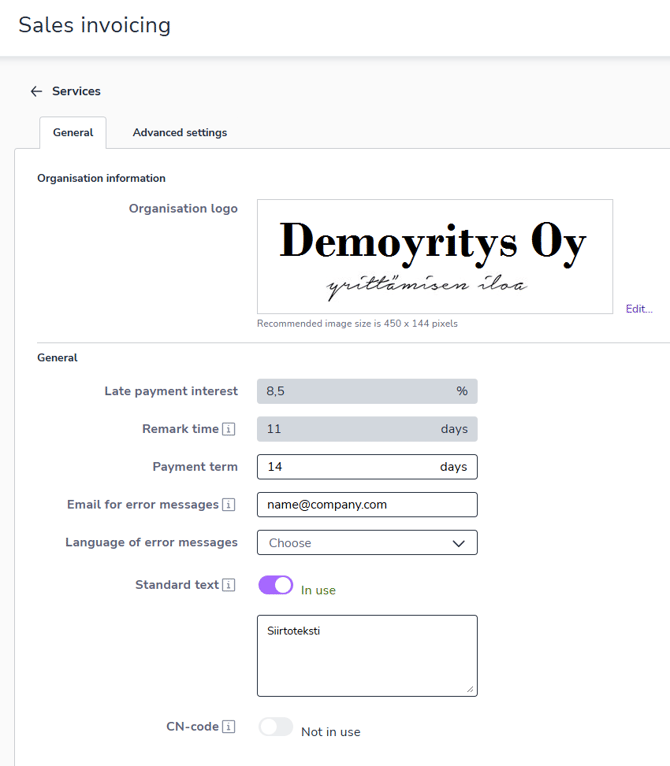
Organisation logo - In this field, you can upload your logo or another image to be displayed on the invoice. The image must be in PNG, JPEG, or JPG format, and the recommended size is 450 x 144 pixels.
Late payment interest is the interest that the debtor is legally obliged to pay if the payment is late from the agreed due date.
Remark time specifies the number of days during which the invoice recipient should notify the invoice sender of an incorrect invoice.
Payment term specifies the default payment period.
Email for error messages specifies the address to which a notification is sent if the email invoice fails to send. The sender of the message is invoicing@easor.com.
Language of error messages determines the language in which the email invoice error message is sent.
Standard text is text that is displayed on all sales invoices. You can use the text, for example, to inform the recipient of a change in account number or contact details.
Enable the CN code setting if you want to display CN codes on invoice product rows and in product register.