
In the payment reminders and collection settings, you can specify, for example, how many days after the due date a payment reminder is sent and whether a reminder fee is added to the invoice. Once payment reminders have been enabled, you can print a payment reminder image in the Sales Invoicing service.
Please note that you must have administrator rights to edit the payment reminder settings.
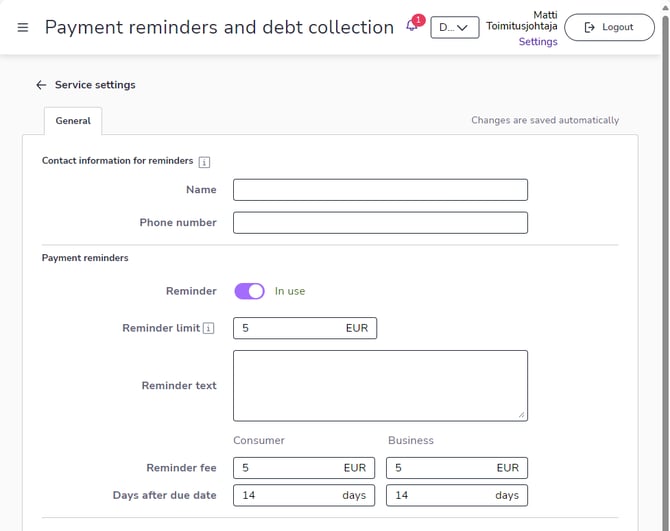
Reminder limit defines the amount that an invoice must exceed in order for a payment reminder to be sent.
Reminder text is the message that is printed on the payment reminder.
Reminder fee is an optional fee that is added to the invoice. Since the legislation is different for consumer and business customers, you can define separate settings for them.
Days after due date defines how many days after the due date the payment reminder is sent. Since the legislation is different for consumer and business customers, you can define separate settings for them.
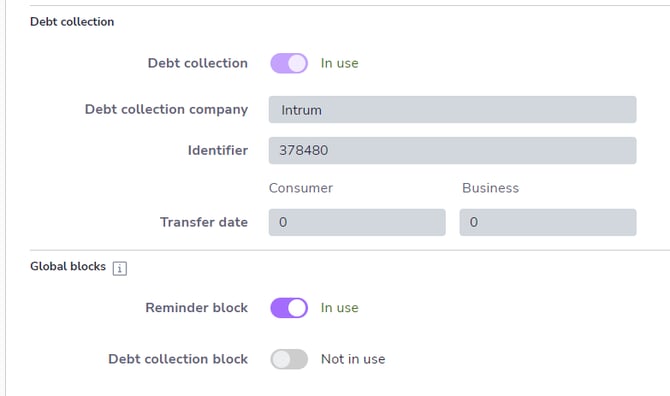
Collection settings cannot be edited, but you can check here what collection settings have been defined for your company if the collection service is in use.
On the Payment reminders and collection page, you can activate reminder and debt collection blocks. A reminder block prevents automatic reminders from being sent for new sales invoices. If you want to block reminders for existing sales invoices, you must set the block for each invoice individually. You can disable the reminder block for individual invoices or customers, in which case the payment reminder settings defined on this page will be followed.