
A clearing account is a temporary account used in accounting, for example, in situations where a transaction appears on the account statement but the corresponding voucher is missing.
On the Easor App front page, you can quickly see if you have any transactions to be cleared, i.e., account transactions for which no voucher or explanation has been submitted to accounting.
- Click on x Issues to be clarified on the front page to go to the Issues to be clarified page. You can also access the page by selecting Material sending from the Easor App main menu and then the Issues to be clarified tab.

- The Issues to be clarified page displays a list of transactions for which a voucher or explanation is missing.
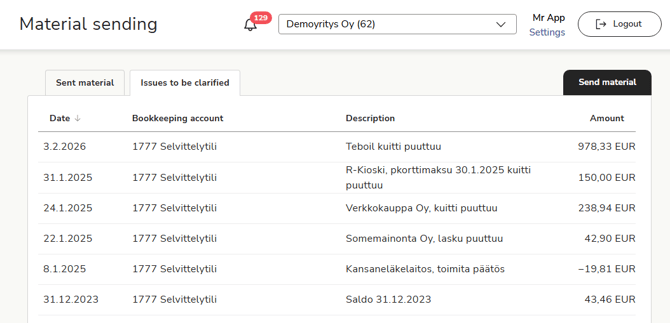
- Select the transaction to be clarified from the list. You must either upload the missing voucher for the transaction or provide a written explanation of the transaction.
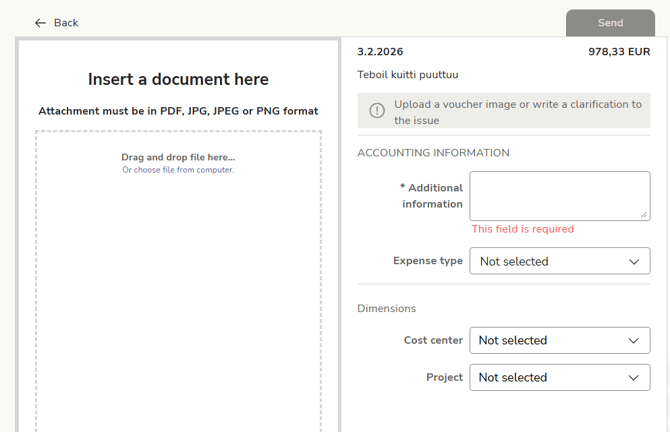
- Upload the voucher for the transaction from your computer as an image (JPG, JPEG, or PNG) or PDF file.
- If the receipt is missing, enter a description of the transaction in the Additional information field.
- Select other transaction details and then select Send.
- The transaction will be removed from the Issues to be clarified list.