
In the Archive view, you can add new documents to the Documents service and delete documents from the archive.
These functions are only visible to accounting firm users.
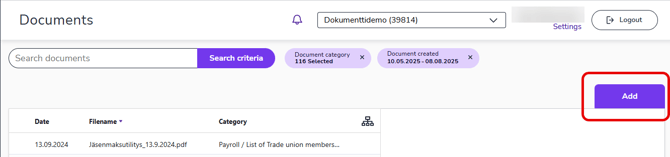
- Select Add in the Archive view.
- On the New document page, import the file from your device and fill in the document details. Permitted file types include PDF files, most common image files, text files, and MS Office documents.
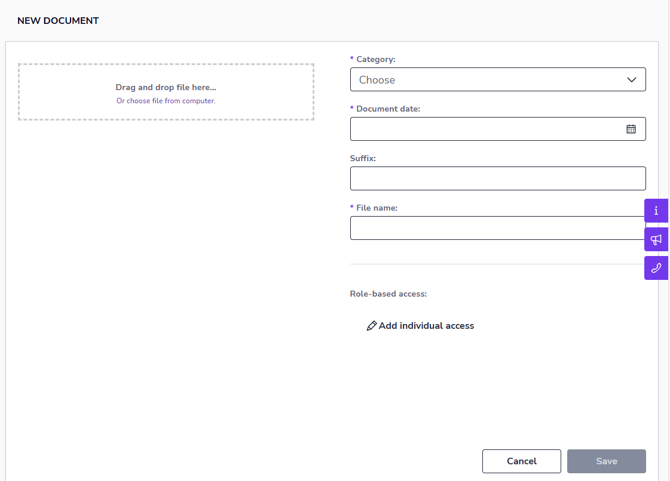
- Category defines the type of document (e.g., accounting, payroll, administration) and facilitates document management. Categories are used in the archive folder view.
- Document date defines the time period to which the document content relates. It is not necessarily the same as the document's archiving date.
- For example, a document is the minutes of a board meeting. The meeting was held on June 1, 2025, and the minutes were written and saved in the archive on June 3, 2025. In this case, the document date is June 1, 2025, and the document archiving date is June 3, 2025.
- You can enter an additional description of the document in the Suffix field. The description is added to the end of the file name.
- The file name is automatically generated based on the document information, but you can freely choose a name for the file if you wish.
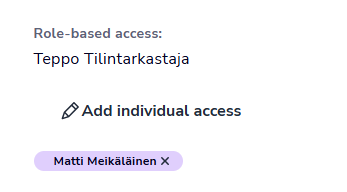
- Role-based access is automatically defined for a document based on its category. Role-based access is typically assigned to auditors, and these rights cannot be modified.
- Individual access defines who can view the document. You can add user-specific access rights by selecting Add individual access, or remove access by clicking the check mark after the name.
3. Finally, select Save and the document will be added to the archive.
4. If you want to delete documents, select one or more documents and then select Delete documents above the table.
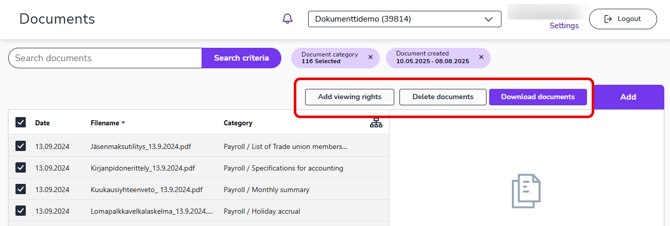
When you delete documents, they are removed from the archive and permanently destroyed after 60 days.