
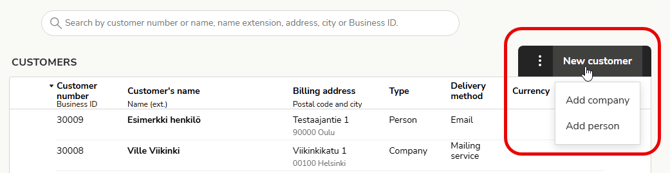
- Create a new customer by selecting New customer and customer type (company or person).
- Fill in the customer's details. Mandatory fields are highlighted with a red border.
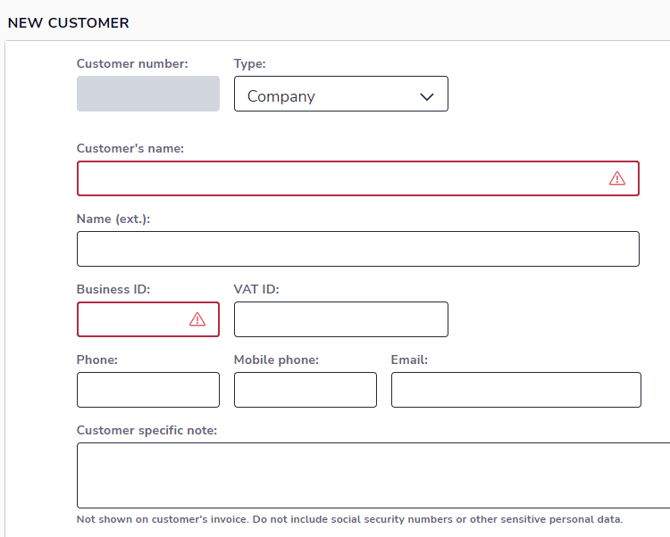
- Customer number: The program selects the next available customer number, but you can edit the customer number if you wish.
- Name: The maximum number of characters for the customer's name is 45.
- Name extension: For example, the name of the recipient or department.
- Business ID: Finnish business customers must be given a business ID in the format 1234567-8. If the company does not have a business ID, select Individual customer as the customer type.
- VAT ID: The Finnish VAT number is in the format FI99999999. VAT numbers are formed differently in different countries, but they always start with a country code followed by a series of numbers or characters (e.g. EE999999999 or SE999999999901).
- Check the validity of a new trading partner's VAT number (VAT ID) before using it in EU trade invoicing and add it to the customer card.
- Customer-specific note: Notes about your customer, such as billing instructions, important information about the customer relationship, or information about price changes. The note is also visible to other users when creating an invoice, but it is not printed on your customer's sales invoice. Do not add sensitive information to this field.
- Addresses: Also enter the customer's delivery address if it differs from the billing address.
- Address extension: E.g., the name of the district or area (foreign addresses).
- Postal code: You can also enter a foreign postal code. Finnish postal codes must be five (5) digits long.
- Country: Check that the billing country is selected correctly. The default country is Finland.
- Default billing method and details: Select the billing method to be used by default for the customer's sales invoices.
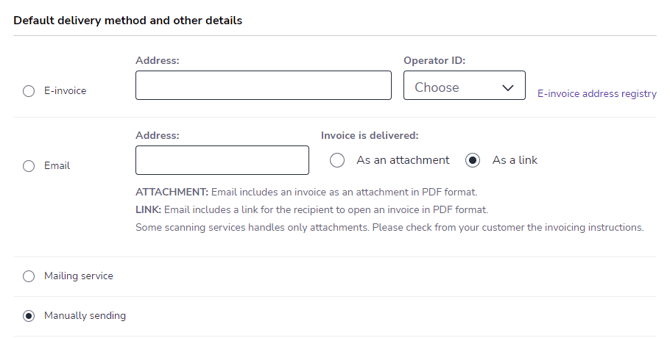
- E-invoice: If the customer has an e-invoice address, the program will automatically retrieve the address after adding the business ID. Select the e-invoice address and intermediary ID. If the e-invoice address cannot be found, check the business ID or search manually in the e-invoice address book.
- Email: Add the customer's email address and select whether the invoice will be sent as an attachment (in PDF format) or as a link in the email message.
- Some scanning services only process attachments, so check the customer's billing instructions.
- Mailing service: The invoice is delivered by letter to the billing address.
- Self-delivery: The invoice is not sent from the program, but is delivered by yourself.
- Default values and blocks for invoicing
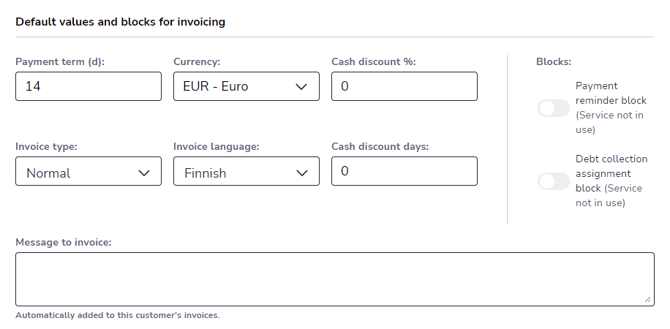
- Payment term (days): Number of days from the invoice date to the due date. The recommendation for consumer customers is 14 days.
- Currency: Default is EUR - Euro.
- Cash discount % and Cash discount days: Information about cash discounts that is used by default on customer invoices.
- Invoice type: If external financing is used for customer invoices, select Financing invoice. Otherwise, select Normal.
- Invoice language: The default language is selected as the invoice language.
- Reminder and collection block: Prevents reminders from being sent or transfers from being made to collection for all invoices for the customer in question.
- ATTENTION. The block is only set for the customer's new invoices. If you want to apply the block to the customer's existing invoices, you must set the block for each invoice individually.
- Message for invoice: Customer-specific message for invoices.
- Accounting default values
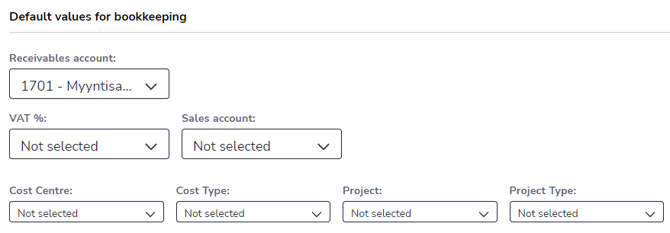
- Receivables account: The default is usually 1701 Accounts receivable.
- VAT % and Sales account: VAT % and sales account used by default in invoice lines added to the invoice, regardless of the VAT % and sales account selected for the product. NOTE. Sales are recorded in the selected sales account and appear in the income statement for this account.
- Dimensions: If dimensions are in use, you can select the cost center, cost type, project, and project type for the customer, which are used by default in the invoice lines, regardless of the dimensions selected for the product.
3. Save the customer card by selecting Save at the top of the view.