---
title: View transactions for a specific time period
description: This article explains how to view transactions for a specific time period in the general ledger and journal.
---
[Skip to content](https://help.easor.com/en/view-transactions-for-a-specific-time-period#main-content)
- [English](https://help.easor.com/en/view-transactions-for-a-specific-time-period)
- [Suomi – Suomi](https://help.easor.com/fi-fi/tarkista-tietyn-ajanjakson-tapahtumat)
English
Show submenu for translations
[](https://help.easor.com/fi-fi?hsLang=en)
Open main navigation
Close main navigation
- - [English](https://help.easor.com/en/view-transactions-for-a-specific-time-period)
- [Suomi – Suomi](https://help.easor.com/fi-fi/tarkista-tietyn-ajanjakson-tapahtumat)
English
Show submenu for translations
- [Easor App -koulutus torstaisin klo 13](https://easor.clickmeeting.com/easor-app-koulutus)
[Easor App -koulutus torstaisin klo 13](https://easor.clickmeeting.com/easor-app-koulutus)
How can we help you?
- There are no suggestions because the search field is empty.
1. [Suomi](https://help.easor.com/en?hsLang=en)
2. [Reports](https://help.easor.com/en/reports?hsLang=en)
3. [General ledger and journal](https://help.easor.com/en/reports?hsLang=en#general-ledger-and-journal)
September 8, 2026
# View transactions for a specific time period
## This article explains how to view transactions for a specific time period in the general ledger and journal.
The general ledger and journal allow you to search for accounting transactions from a specific time period. With this feature, you can also, for example, check the number of vouchers for a specific month.
By default, the report displays the most recent closed accounting period. When you change the time period, the transaction list updates automatically.
1\. Select **Journal** or **General ledger** from the upper-left corner of the view.
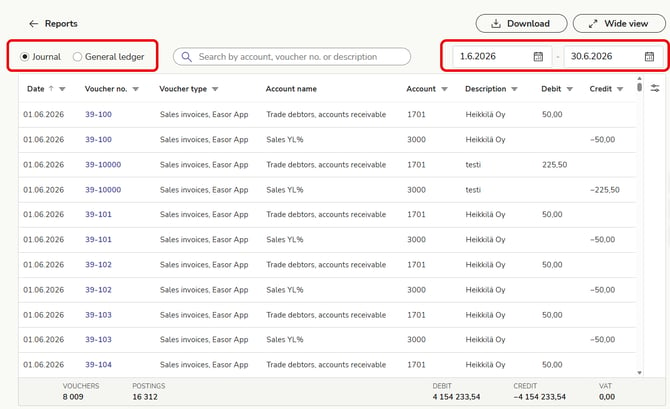
2\. Select the start and end dates of the period you want to search for in the date fields in the upper-right corner. You can enter the date in the format dd.mm.yyyy or, for example, 01012025. You can also select a date from the calendar icon.
3\. The transaction list updates, and the summary bar at the bottom updates to show the information for the selected period.
- [Release notes and product news](https://help.easor.com/en/release-notes-and-product-news?hsLang=en)
- [Service status updates](https://help.easor.com/en/service-status-updates?hsLang=en)
- [Support](https://help.easor.com/en/support?hsLang=en)
- [Home page](https://help.easor.com/en/home-page?hsLang=en)
- [Documents](https://help.easor.com/en/documents?hsLang=en)
- [Easor App mobile](https://help.easor.com/en/easor-app-mobile?hsLang=en)
- [Payments](https://help.easor.com/en/payments?hsLang=en#main-content)
- [New Payments service](https://help.easor.com/en/payments?hsLang=en#new-payments-service)
- [Sales invoicing](https://help.easor.com/en/sales-invoicing?hsLang=en)
- [Recurring invoicing](https://help.easor.com/en/recurring-invoicing?hsLang=en)
- [Bank accounts](https://help.easor.com/en/bank-accounts?hsLang=en)
- [Reports](https://help.easor.com/en/reports?hsLang=en#main-content)
- [General ledger and journal](https://help.easor.com/en/reports?hsLang=en#general-ledger-and-journal)
- [Simple Salaries](https://help.easor.com/en/simple-salaries?hsLang=en)
- [Material sending](https://help.easor.com/en/material-sending?hsLang=en)
- [Settings](https://help.easor.com/en/settings?hsLang=en)
- [General](https://help.easor.com/en/general?hsLang=en#main-content)
- [VAT](https://help.easor.com/en/general?hsLang=en#vat)
[](https://easor.com/fi/?hsLang=en)
## Asiaa asiakaspalveluun?
Palvelemme arkisin klo. 7:00–21:00.
📞 0207 525 110
✉️ [asiakaspalvelu@easor.com](mailto:asiakaspalvelu@easor.com)
[mailto:asiakaspalvelu@easor.com](mailto:asiakaspalvelu@easor.com)
Copyright © 2026 Easor