---
title: View transactions by accounting account
description: This article explains how to view transactions by accounting account in the general ledger.
---
[Skip to content](https://help.easor.com/en/view-transactions-by-accounting-account#main-content)
- [English](https://help.easor.com/en/view-transactions-by-accounting-account)
- [Suomi – Suomi](https://help.easor.com/fi-fi/tarkastele-tapahtumia-kirjanpitotileittain)
English
Show submenu for translations
[](https://help.easor.com/fi-fi?hsLang=en)
Open main navigation
Close main navigation
- - [English](https://help.easor.com/en/view-transactions-by-accounting-account)
- [Suomi – Suomi](https://help.easor.com/fi-fi/tarkastele-tapahtumia-kirjanpitotileittain)
English
Show submenu for translations
- [Easor App -koulutus torstaisin klo 13](https://easor.clickmeeting.com/easor-app-koulutus)
[Easor App -koulutus torstaisin klo 13](https://easor.clickmeeting.com/easor-app-koulutus)
How can we help you?
- There are no suggestions because the search field is empty.
1. [Suomi](https://help.easor.com/en?hsLang=en)
2. [Reports](https://help.easor.com/en/reports?hsLang=en)
3. [General ledger and journal](https://help.easor.com/en/reports?hsLang=en#general-ledger-and-journal)
September 8, 2026
# View transactions by accounting account
## This article explains how to view transactions by accounting account in the general ledger.
In the **general ledger** report, transactions are displayed by accounting account. Use the general ledger when you want to check account-specific transactions or balances.
The general ledger lets you quickly see what makes up the transactions and balances for a specific accounting account.
1\. Select **Reports** \> **General ledger and journal**.
2\. Select **General ledger** in the upper-left corner.
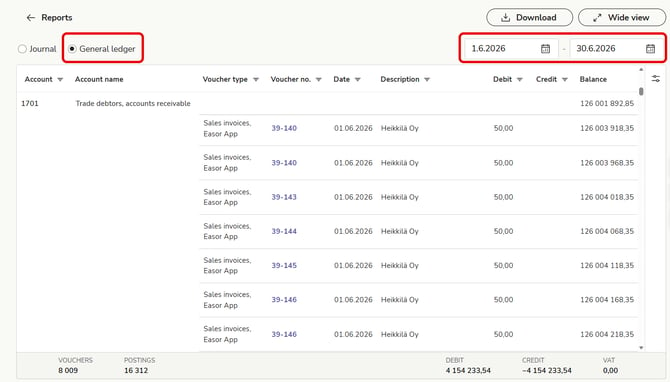
3\. Select a time period in the upper-right corner.
4\. Transactions are displayed by accounting account for the selected time period.
5\. In the **Balance** column, you can check the account balance information.
- [Release notes and product news](https://help.easor.com/en/release-notes-and-product-news?hsLang=en)
- [Service status updates](https://help.easor.com/en/service-status-updates?hsLang=en)
- [Support](https://help.easor.com/en/support?hsLang=en)
- [Home page](https://help.easor.com/en/home-page?hsLang=en)
- [Documents](https://help.easor.com/en/documents?hsLang=en)
- [Easor App mobile](https://help.easor.com/en/easor-app-mobile?hsLang=en)
- [Payments](https://help.easor.com/en/payments?hsLang=en#main-content)
- [New Payments service](https://help.easor.com/en/payments?hsLang=en#new-payments-service)
- [Sales invoicing](https://help.easor.com/en/sales-invoicing?hsLang=en)
- [Recurring invoicing](https://help.easor.com/en/recurring-invoicing?hsLang=en)
- [Bank accounts](https://help.easor.com/en/bank-accounts?hsLang=en)
- [Reports](https://help.easor.com/en/reports?hsLang=en#main-content)
- [General ledger and journal](https://help.easor.com/en/reports?hsLang=en#general-ledger-and-journal)
- [Simple Salaries](https://help.easor.com/en/simple-salaries?hsLang=en)
- [Material sending](https://help.easor.com/en/material-sending?hsLang=en)
- [Settings](https://help.easor.com/en/settings?hsLang=en)
- [General](https://help.easor.com/en/general?hsLang=en#main-content)
- [VAT](https://help.easor.com/en/general?hsLang=en#vat)
[](https://easor.com/fi/?hsLang=en)
## Asiaa asiakaspalveluun?
Palvelemme arkisin klo. 7:00–21:00.
📞 0207 525 110
✉️ [asiakaspalvelu@easor.com](mailto:asiakaspalvelu@easor.com)
[mailto:asiakaspalvelu@easor.com](mailto:asiakaspalvelu@easor.com)
Copyright © 2026 Easor