
On the Settings page, you can define user- and company-specific settings.
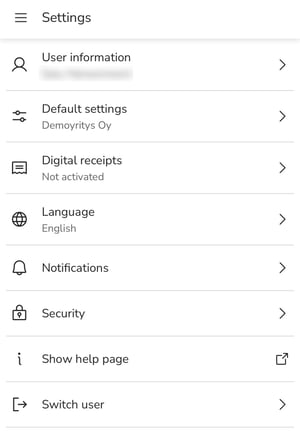
User information
- Information about the user who is logged in, the user's account number, and whether a personal identification number has been saved.
- The account number can be saved in either IBAN or BBAN format. IBAN is used in Finland and BBAN in Sweden. If you are creating an expense invoice for a Swedish company, specify the account number in BBAN format.
Default settings
- In this view, you can specify company-specific default settings for expenses, such as expense type, cost center, and project. The default settings are used when you send travel and expense invoices and accounting documents.
Digital receipts
- If the digital receipts service has not been enabled, you can access the ReceiptHero page from here, where you can enable the service.
- If the digital receipts service has been enabled, all credit cards linked to the service are displayed here.
Language
- The language selection is set to the phone's language by default. If necessary, you can change the language to Finnish, Swedish (Finland), Swedish (Sweden), or English.
Notifications
- Enable push notifications if you want to receive notifications when new receipts arrive in the digital receipts service (ReceiptHero).
Security
- Here you can enable biometric authentication.
Show help page
- This takes you to the user instructions.
Switch user
- If biometric authentication is enabled, this function disables biometric authentication. The next time you log in, the app will ask for your username and password.