
Getting started with Simple Salaries is quick and easy. If the requested information remains unchanged, these steps only need to be performed once when activating the service.
Logging in to the program
1. Log in to Easor App.
2. Select Simple Salaries from the main menu on the left.
3. Activate the service by signing the power of attorney, which can be found under the Simple Salaries service when you log in for the first time.
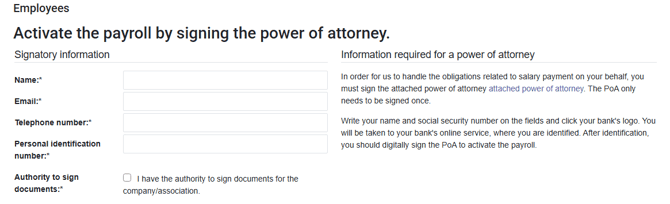
Do not start using the system until the Invoice payment service has been activated.
Adding insurance information
The first time you log in, the system will ask you to enter any insurance information. You can access your insurance information by selecting Settings - Insurances.
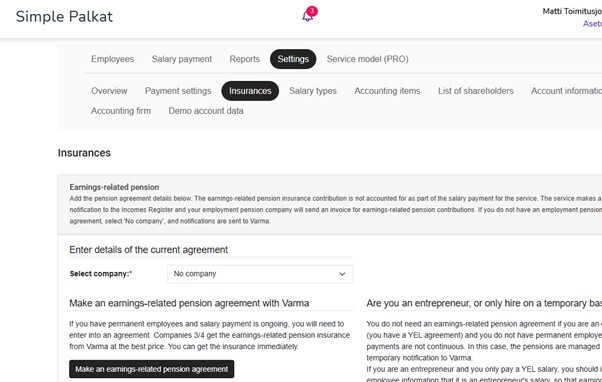
What should I do if I pay salaries to employees?
TyEL insurance is statutory, i.e., compulsory insurance that secures your employees' pensions.
As an employer, you must take out TyEL insurance if your employees' salaries exceed €70.08 (2025) per month and the employee is within the age limits for compulsory insurance. The insurance must be taken out no later than when the first salary is paid.
TyEL and accident insurance information must be added to the system from the drop-down menus. If you have not yet taken out TyEL or accident insurance for your company, you can purchase them from our partners through the Simple Salaries service. Our partner for TyEL insurance is Varma and for accident insurance Lähitapiola. YEL information does not need to be added to the system at all.
What should I do if I only pay wages to an entrepreneur?
YEL insurance is mandatory for entrepreneurs and cannot be replaced by voluntary insurance. However, you do not need to add YEL information to the system, as entrepreneurs handle YEL payments directly with their insurance company. If you have not yet taken out YEL insurance, you can purchase insurance through the Simple Salaries service from our partner Varma.
For insurance companies, select No company for TyEL and accident insurance in the system and then save the information at the bottom right of the page.