
1 .Create a new product by selecting New product in the main view of the product register.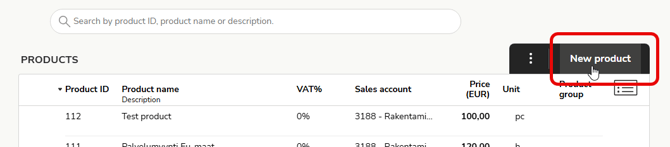
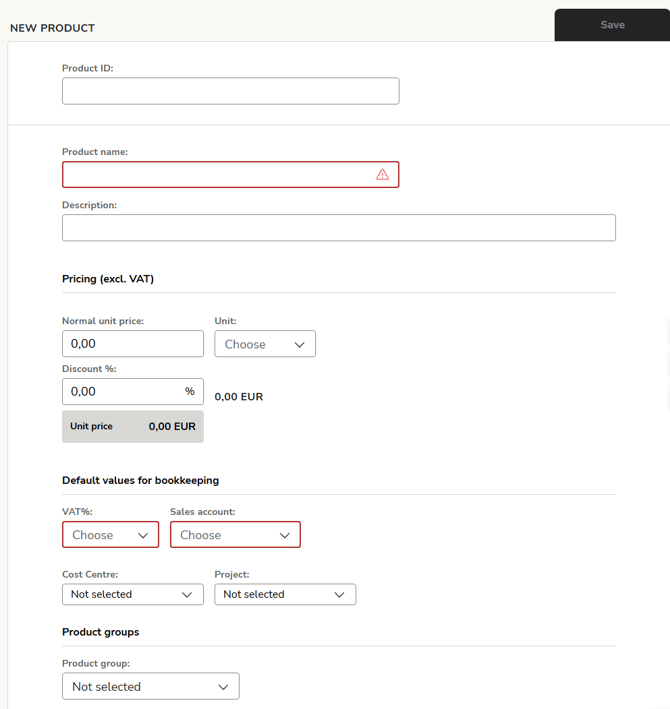
2. Enter the product details. Mandatory information is highlighted with a red frame.
-
Product ID: The maximum number of characters for the product ID is 30.
-
Product name: The maximum number of characters for the product name is 45.
-
Description: The description appears on the invoice below the product name. The maximum number of characters is 1024.
-
Pricing (excluding tax)
-
Normal unit price: Unit price excluding tax, with a maximum of five (5) decimal places.
-
Unit: Select the unit or enter it yourself (maximum number of characters: 14)
-
Discount %: Percentage discount with two (2) decimal places, without the percent sign (e.g., 2.00).
-
-
Accounting default values
-
VAT% and Sales account: After selecting the VAT percentage, only accounts that have been created in the sales ledger with the same VAT percentage can be selected as sales accounts.
-
Dimensions - If dimensions are in use, you can select the cost center, cost type, project, and project type for the product, which will be used by default in the invoice lines added to the invoice.
-
-
Product group: The product can be linked to one product group.
3. Finally, select Save to save the product information.
If a default sales account or tracking items are selected on the customer card, they will be used by default for posting invoice lines.